


No credit card required


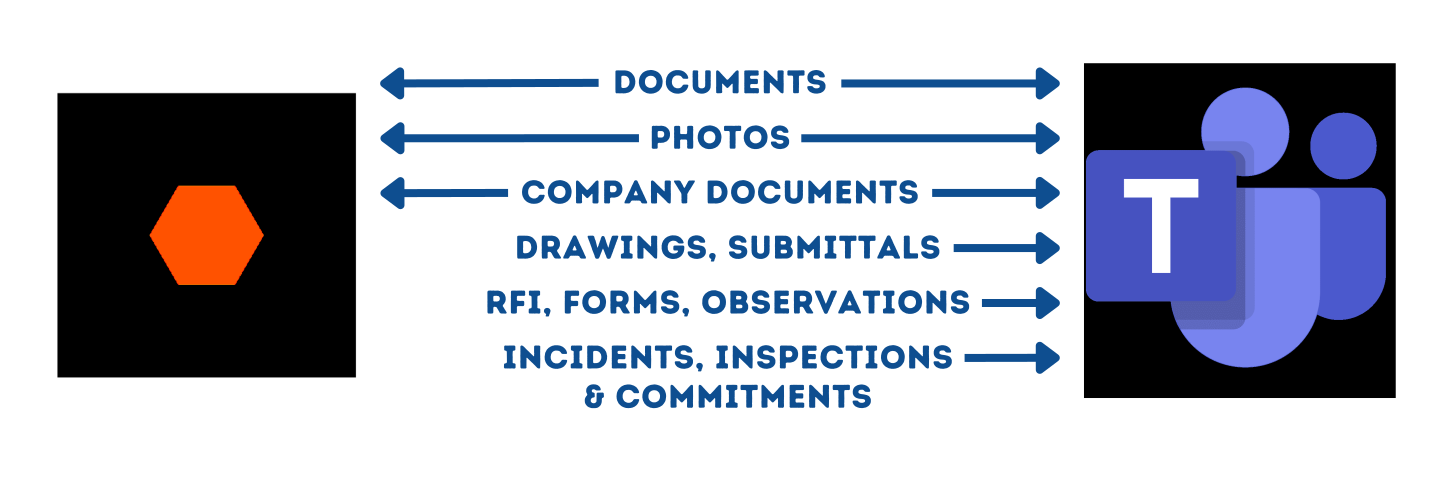
Key Features
Real-Time Project Updates
Stay informed with instant notifications and updates from Procore within Microsoft Teams, ensuring all team members are on the same page and aware of project changes.
Document Collaboration
Effortlessly share and collaborate on Procore project documents, drawings, and plans directly within Microsoft Teams, enhancing document management and teamwork.
Task Management and Assignments
Create, assign, and track project tasks from Microsoft Teams, synchronising them with Procore for efficient task management and progress monitoring.
Bidirectional Communication
Initiate discussions and communicate seamlessly between Procore and Microsoft Teams, fostering real-time collaboration, problem-solving, and decision-making.
Integrated Project Data
Access project data from Procore, such as schedules, budgets, and timelines, within Microsoft Teams, facilitating quick access to critical project information for informed discussions and actions.
Discover why our customers trust our Procore and Microsoft Teams integration to securely run their business. Learn more on our casestudies page.
Procore & Microsoft Teams: Access work file anywhere
Seamlessly integrate between Procore and OneDrive, Teams,SharePoint, and Windows Explorer. Our integration enables real-time syncing of data and eliminates the need for manual data entry, saving you valuable time and resources.


Customer Challenges and Concerns
Proposals take too long to get out to prospects. Too much duplication of effort, finding-replacing.
Reps are sending out proposals with mistakes, typos, incorrect pricing, and terms.
Everyone is using their own tools and process to send proposals.
What prospects sign off on doesn’t get accurately reflected in the CRM.
Proposals take too long to get out to prospects. Too much duplication of effort, finding-replacing.
Word, Powerpoint, and Excel just aren’t cutting it anymore.
Why SyncEzy
+
Deep Integrations
Million +
Records synced per month
Countries
Hour
Support

We’ve been an official integration partner with Procore since 2019. We were one of the earliest on their Marketplace and to date we have built four of their top 25 apps! We have multiple deep integrations into the various Procore tools and work closely with the Procore team. We are proud to be three of the top Twenty Five Apps on the Procore Marketplace. Check SyncEzy out at the Procore Marketplace or perhaps we’ll see you at the next Groundbreak.

SyncEzy is an official Microsoft partner and our integrations are listed and approved on the Microsoft Azure Marketplace. Our integrations are public apps on the Microsoft Azure Cloud. We are specialists in SharePoint and Azure Cloud / Document storage integrations. In addition, we also have integrations into PowerBI and other Microsoft apps. You can find all our Microsoft integrations here, on the Microsoft Azure Marketplace.
What Our Customers Say About Us
I love this Syncezy Product..

Bryan Clarke
Managing Member, Bison Rail SystemsIt helped us to have a single version of the updated documents and reduce the storage space on the laptops of those involved.
Alexander
Senior Project Engineer, Tabor ReimersRelated Case Studies
Exploring In-Depth Knowledge
Get the Complete Walkthrough


More About Procore & Microsoft Teams

Groundbreak Wrap Up 2026 – What you need to know
Most Procore teams still keep project files in more than one place.Ask where the latest drawing lives and the honest answer is often "Procore, and also SharePoint, and also a

Hari Iyer | SyncEzy
CEO Save it once: how construction teams are syncing Procore and Dropbox
Most construction businesses we talk to that run Procore alongside Dropbox don't have a systems problem. They have a gap problem. Procore runs the projects. It's where the documents that
Hari Iyer | SyncEzy
CEO Procore + Google Drive integration: what syncs and what doesn’t
A lot of construction teams are split. Procore runs the project. Google Drive runs everything else: pre-construction, estimating, design collaboration, internal documents. The two systems don't talk to each other,
Hari Iyer | SyncEzy
CEOSoftware Partnerships

Here are some Frequently Asked Questions?
Providing fixed pricing on integrations is difficult as different-sized companies have different requirements & support levels (i.e. a 5-person business vs a 500-person, multi-site company). Our team are specialists in tailoring implementation & support packages that make sense for a business of your size. Click the “Chat Now” button on the bottom right of this page to start the conversation.
- Register a SyncEzy Account
- Find the Procore / Microsoft Teams integration from the Integration library
- Subscribe to the Procore / Microsoft Teams integration.
- Authenticate Procore
- Authenticate Microsoft Teams
- Complete the configuration steps.
We pride ourselves on the quality of our support and have the testimonials from customers to prove it. It is no wonder that most customers have stayed with us for more than 3 years!
Let us Automate your business!
We have a team ready to answer any questions and help you get started. Drop your details here and we'll get back to you within 24 hours.