

Hari Iyer | SyncEzy
CEO 10 Min Read
 Jul 13, 2026
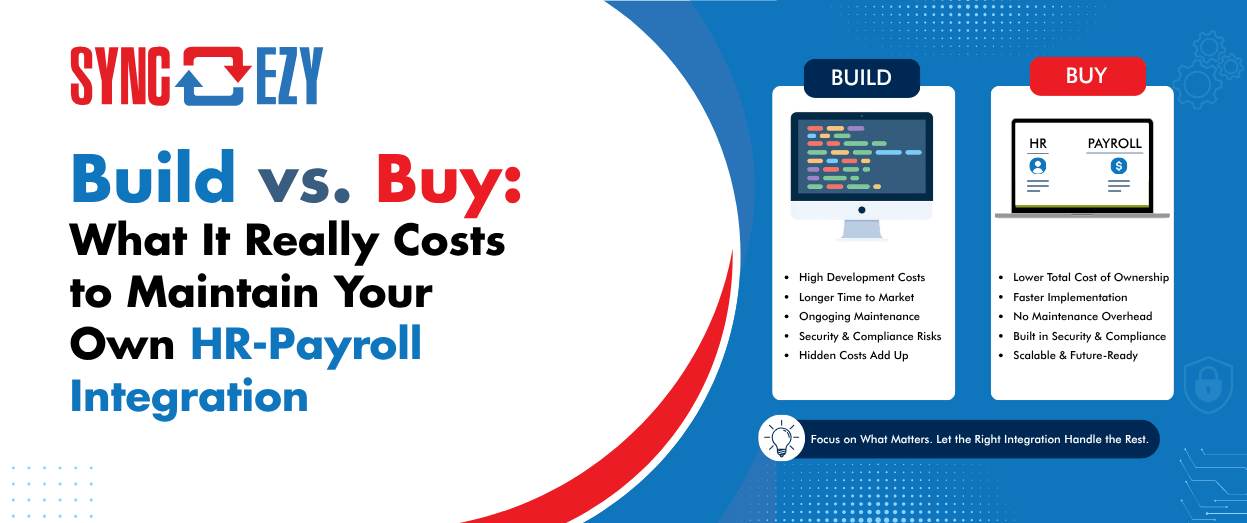
Every few weeks we get on a call with an IT manager who says some version of the same thing: “We looked at your connector, but our developer reckons he can build this in a couple of weeks with the APIs.”
He’s probably right. He probably can.
That’s the trap.
The build is the cheapest part of an HR-to-payroll integration. It’s the part with a visible price tag, a project plan, and a satisfying demo at the end. What nobody scopes on day one is the decade of maintenance that follows — because an integration between your HR system and your payroll engine isn’t a project. It’s a product. And products need owners, roadmaps, monitoring, and someone awake when they break at 2 am on pay day.
We’ve spent years building and maintaining integrations between platforms like HiBob, Employment Hero Payroll (KeyPay), and ADP Payforce, so we’ve made most of these mistakes ourselves, at scale, so our customers don’t have to. Here’s what the true cost picture actually looks like.
The version your developer scoped
The initial build usually goes something like this. Pull employees from the HR platform’s API. Map the fields — name, email, start date, salary, bank details, super fund, tax file number declaration. Push them into the payroll engine. Add a scheduled job to sync changes. Test with a handful of employees. Ship it.
For a mid-market Australian company, that’s realistically two to six weeks of a competent developer’s time. Call it $15,000 to $40,000 in loaded salary cost depending on complexity and how many edge cases you handle up front. Compared to a subscription integration, that can look like a bargain.
But that estimate contains three quiet assumptions: that both APIs stay the way they are, that your payroll rules stay the way they are, and that the developer who built it stays at your company. Over a five-year horizon, all three assumptions fail. Usually all of them.
Cost #1: APIs are moving targets
HR platforms and payroll engines are venture-funded, fast-shipping SaaS products. They deprecate endpoints, change authentication schemes, tighten rate limits, restructure payloads, and retire whole API versions — and they do it on their timeline, not yours.
In the last few years alone, we’ve absorbed changes like OAuth scope restructures, webhook payload format changes, new mandatory fields appearing in employee objects, rate limits being cut without much notice, and entire v1 APIs being sunset with a migration window measured in months. Each one of these is a small project. None of them delivers any new business value — the integration does exactly what it did before; it just doesn’t break.
When you own the integration, every one of those changes lands on your internal team’s backlog, competing with actual roadmap work. In practice, deprecation notices go to an inbox nobody monitors, and the first sign of trouble is a failed pay run. When a vendor owns the integration, that maintenance is amortised across every customer on the connector. We watch the changelogs, sit in the partner programs, and get advance notice of breaking changes because it’s literally our whole business.
A realistic budget for API churn alone is one to three weeks of developer time per year, per integration, forever. That’s before anything actually goes wrong.
Cost #2: Australian payroll never sits still
ents are categorised at the source. Award interpretation decisions from the Fair Work Commission can change how leave loading, allowances, or casual loading need to flow between systems.
Here’s why this hits your integration and not just your payroll team: the integration is where the categorisation happens. When STP Phase 2 landed, it wasn’t enough for the payroll engine to support the new reporting categories — every field mapping feeding that engine had to be revisited. Employment basis, income stream types, cessation reasons, salary sacrifice classification: if your homegrown sync was populating any of those fields (and it was), someone had to re-map them, re-test them, and re-verify them against real pay runs.
An in-house integration means your developers now need a working knowledge of Australian payroll compliance. That’s a genuinely rare skill combination, and the cost of getting it wrong isn’t a bug ticket — it’s incorrect ATO reporting, underpaid super, or the kind of underpayment remediation program that ends up in the AFR.
Cost #3: The edge cases you meet one payroll cycle at a time
The demo works because the demo uses clean data. Production data is where integrations go to suffer. A partial list of things that will happen to your integration in its first two years:
An employee changes their bank details on the morning of payday, after the sync has run. Someone is terminated and re-hired within the same pay period. An employee exists in the HR system twice because a manager created a duplicate. A name contains a character the payroll API rejects. A new leave type is created in the HR platform and silently fails to map to anything in payroll — so leave is approved in one system and never deducted in the other. Two admins edit the same record in different systems within the same sync window, and you discover you never designed a conflict-resolution strategy.
That last category — leave type mapping — deserves special mention because it looks trivial and absolutely is not. HR platforms let admins create arbitrary leave types; payroll engines have structured leave categories with specific accrual and payment rules attached. Keeping those reconciled as both systems evolve is one of the hardest ongoing problems in this entire domain, and it’s invisible until an employee’s annual leave balance is wrong.
None of these edge cases appear in the original scope, because you can’t scope what you haven’t met yet. A commercial connector has already met them, across hundreds of customers, and encoded the answers into the product.
Cost #4: Operations — the cost of nobody watching
An integration that runs on a cron job with no monitoring isn’t an integration; it’s a time bomb with a schedule. Real operational ownership means logging and alerting on every sync, retry logic with backoff for transient API failures, a queue or dead-letter mechanism for records that fail validation, a dashboard someone actually checks, and a human process for what happens when the Thursday-night sync fails before a Friday pay run.
Pay runs are the least forgiving deadline in business software. Employees tolerate a lot of IT friction; they do not tolerate not being paid. That means your homegrown integration effectively needs an on-call rotation, or at least a named owner with their phone on. When that owner resigns — and the single developer who built the thing always eventually resigns — you’re left with an undocumented system that moves money-adjacent data, that nobody remaining understands, and that nobody wants to touch.
We’ve onboarded more than one customer whose “build” decision ended exactly there: not with a failure, but with a resignation letter.
Cost #5: Security and compliance scrutiny you didn’t sign up for
An HR-to-payroll integration handles the most sensitive data category in your company: salaries, tax file numbers, bank accounts, and increasingly health-adjacent leave information. The moment you build it in-house, that pipeline is inside the scope of every security review you face.
It’s also inside the scope of Australian privacy law. If your business turns over more than $3 million a year, you’re covered by the Privacy Act and the Australian Privacy Principles, and serious breaches of employee data — tax file numbers and bank details very much included — fall under the Notifiable Data Breaches scheme. Now picture how a DIY integration actually gets operated in year two: someone exports a CSV of every employee’s details out of the HR system to massage a field before import, and that spreadsheet — names, TFNs, salaries, bank accounts — sits in the Downloads folder of a laptop. That single carelessly parked file is a data breach time bomb: one lost laptop, one compromised account, one wrong email attachment away from a notifiable incident, regulator involvement, and a very uncomfortable all-staff email. Manual CSV workflows don’t just cost time; they scatter your most sensitive data across endpoints that were never meant to hold it.
Your customers’ security questionnaires will ask how employee data in transit is encrypted, where credentials are stored, how access is logged, and what your subprocessor register looks like. Your ISO 27001 or SOC 2 auditor will ask who reviews the integration’s access keys, how secrets are rotated, and where the audit trail lives. A homegrown script with an API key in an environment variable is a finding waiting to be written up.
Buying doesn’t make that scrutiny disappear — it transfers it to a vendor whose business depends on answering it well, with certifications, documented data flows, and a security program that gets tested by hundreds of customers’ assessments instead of just yours. (Interrogate your vendor on this. If they can’t produce their security documentation quickly, that tells you something too.)
The five-year math
Here’s the honest comparison for a typical mid-market Australian company running a global HR platform against a local payroll engine:
| Cost line | Build (in-house) | Buy (connector) |
| Initial build / setup | $15k–$40k dev time | Setup fee, typically days not weeks |
| API change maintenance | 1–3 weeks/yr dev time | Included |
| Compliance-driven rework (STP, super, awards) | Unbudgeted spikes, high risk | Included, tested across customer base |
| Edge cases & bug fixes | Ongoing, discovered in production | Largely pre-solved |
| Monitoring & on-call | Internal tooling + a named owner | Vendor’s job, with SLAs |
| Key-person risk | High | None |
| Security audit surface | Yours entirely | Shifted to certified vendor |
| Five-year realistic total | $80k–$200k+ and attention | Predictable subscription |
The subscription line on that table is the only number that’s actually knowable in advance. Everything in the build column is an estimate that history says will be exceeded — because the build column is really a bet that two SaaS APIs, Australian payroll law, and your own org chart will all hold still for five years.
When building genuinely makes sense
We’re an integration company, so discount this section accordingly — but building is the right call in some situations. If your workflow is genuinely unique and no connector exists or is coming, build. If integration is your product — you’re a payroll bureau or an outsourced HR provider and the pipeline is your competitive moat — build, and staff it properly as a product. If you’re integrating internal systems where a failed sync means an annoyed analyst rather than a missed pay run, the stakes may not justify a vendor.
For everything else — the standard, high-stakes, compliance-laden pipe between your HCM and your payroll engine — you’re not deciding whether to build an integration. You’re deciding whether to permanently take on a small product team’s worth of responsibility for a system that, at its very best, nobody ever notices.
The real question to ask your team
Don’t ask your developer “can we build this?” The answer is yes, and it’s the wrong question.
Ask instead: who owns this in year three? Who re-maps the fields when the next STP phase lands? Who gets paged when the sync fails at 11 pm before payday? Who answers the section of the customer security questionnaire that asks about this data flow? If those questions have crisp answers with names attached, you can build. If the answer is “we’ll figure it out,” you already have your answer.
Author
Hari Iyer | SyncEzy
CEO

Hari Iyer is the Founder and CEO of SyncEzy, a pioneering company at the forefront of data integration and automation solutions. With a deep understanding of the power of technology and a passion for solving complex business challenges, Hari has emerged as a visionary leader in the industry. His relentless pursuit of excellence and commitment to delivering tangible results have earned SyncEzy a loyal global clientele.
He is not only a successful entrepreneur but also an active contributor to the technology community, sharing his insights through thought leadership articles, speaking engagements, and mentorship programs. Hari’s ability to navigate the complexities of remote work serves as an inspiration for leaders, highlighting the importance of flexibility, work-life balance, and a results-oriented approach in today’s evolving work landscape.
Under his guidance, SyncEzy has gained widespread recognition for its deep integration solutions that seamlessly connect software applications, eliminate data silos, and enhance operational efficiency.
When not working, Hari is trying to be a better father, reading tech news, playing FPS games, and not exercising as he should.

Related Posts
Tags
Categories

Preceda Payroll Is Shutting Down: What It Means for Your Business and integrated payroll — and How to Move Forward with Modern, Integrated Payroll Solutions
Across Australia and New Zealand, hundreds of organisations rely on Preceda Payroll as the backbone of their HR and pay operations. But with Preceda now officially reaching End-of-Life (EOL), businesses face a critical transition point. If your organisation has invested heavily in integrating Preceda with your HRMS, ERP, rostering, or time-and-attendance systems, this change may… Continue reading Preceda Payroll Is Shutting Down: What It Means for Your Business and integrated payroll — and How to Move Forward with Modern, Integrated Payroll Solutions
Hari Iyer | SyncEzy
CEO

