


No credit card required


Key Features
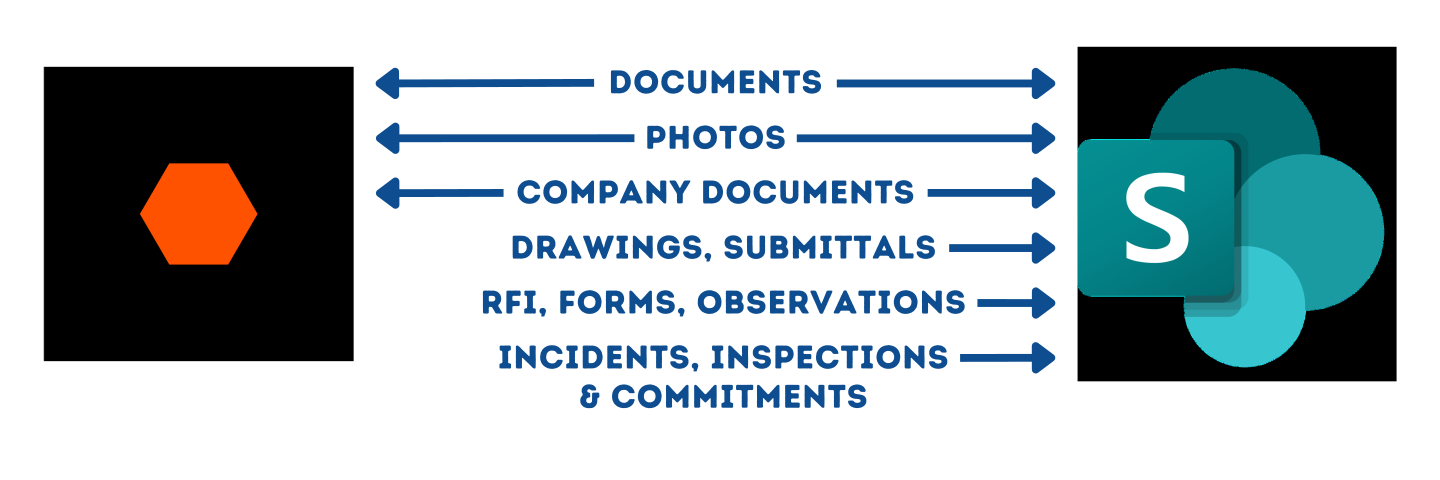
Two Way Sync of Procore Data
Automatically sync Procore Documents, Photos and folder structure into SharePoint / OneDrive and make it easier to access and edit from anywhere in Office 365.
Easier Access via Windows Explorer
Save 11 clicks every time you access a single document for your project. For Project Managers that is thousands of clicks and time saved over the life of the project.
Use Powerful Desktop Software
Use Desktop versions of Word, Excel and Office 365, Save locally and auto sync to Procore Cloud. Save locally on desktop and Auto Sync to cloud.
Backup Everything to your Organisation’s Cloud
Extract Procore tools like Documents, Photos, RFIs, Submittals and more to your organization’s SharePoint for Backup, redundancy and ISO Compliance
Work on BlueBeam files and PDF markups Locally
Easily work on BlueBeam files locally by accessing the files from your Windows explorer.
Single Source of Truth, Same data in both places.
Access your files from Procore or SharePoint and get the same Files and the same exact Folder structure in both places. Get the best of both worlds.
4 in 1 Integration, Connect SharePoint, OneDrive, MS Teams and Windows Explorer
This single integration brings together all four ways to access your data on Windows, via SharePoint, OneDrive, MS Teams or the familiar Windows Explorer.
Built with Security in Mind – Soc2 Type 2, CASA Approved
All our integrations are built with Security in mind from the start. We are a Soc2 Type 2 Certified organization. We are also approved as per the Cloud application Security Assessment.
Discover our Procore & SharePoint Integration case studies. Learn more on how customers use this integration to make their teams more productive.
Procore SharePoint Office 365 Integrations explainer video
Seamlessly integrate between Procore and SharePoint, Teams, OneDrive, and Windows Explorer. Our integration enables real-time syncing of data and eliminates the need for manual data entry, saving you valuable time and resources.


Do any of these challenges sound familiar ?
Field and Office staff have different versions of documents?
Do team members forget to Upload documents to Procore? Saving Locally ?
Unable to access Procore data Offline?
Saving Data locally to work with Bluebeam ?
Can’t access Procore files from the familiar and quicker Windows Explorer interface?
Can’t use Desktop versions of Excel and Word ?
It’s slow to access Procore Project Data ?
No Redundancy to Procore Data for ISO Compliance or Business Process?
Two Way Syncing of Documents and Photos between One Drive Folders and Procore ?
ROI Calculator
SyncEzy's Procore SharePoint ROI Calculator
Results Summary
This Integration at a Glance
Countries
Seconds
Avg Sync Speed
+
Projects
Million +
Files Synced

We’ve been an official integration partner with Procore since 2019. We were one of the earliest on their Marketplace and to date we have built four of their top 25 apps! We have multiple deep integrations into the various Procore tools and work closely with the Procore team. We are proud to be three of the top Twenty Five Apps on the Procore Marketplace. Check SyncEzy out at the Procore Marketplace or perhaps we’ll see you at the next Groundbreak.

SyncEzy is an official Microsoft partner and our integrations are listed and approved on the Microsoft Azure Marketplace. Our integrations are public apps on the Microsoft Azure Cloud. We are specialists in SharePoint and Azure Cloud / Document storage integrations. In addition, we also have integrations into PowerBI and other Microsoft apps. You can find all our Microsoft integrations here, on the Microsoft Azure Marketplace.
What Our Customers Say About Us
With SyncEzy, everything syncs automatically, making our work faster and more reliable.

Haritha Paulose
Project Coordinator at TeslaWe save the equivalent of a full-time position worth of labour in file management alone

Colton Chladek
Director of I.T., Knobelsdorff EngineeringIt does everything procore sync did plus more…the platform is more user-friendly and runs smoother than my experiences with other sync tools.
Joseph Lombardi
Superintendent, Shawmut Design and ConstructionSyncezy took care of those problems with the sharepoint sync with procore, and then by Syncing the sharepoint folder to desktops for the office team, they were able to use the explorer interface to interact with the folder.
Nick Holt
Senior System Administrator, Holt ConstructionBeing able to sync RFI’s, submittals and photos in addition to documents has been pretty cool.

Chris Thomas
Director of Information Technology at Harkins BuildersSet it and forget it! It’s so easy to set up and continues to work in the background to make sure all information is available wherever needed.
Kelly Grossmann
Project Coordinator, McNelly Services, Inc.Easy and quick access for the wider project team.
Sora Araki
Engineer at NorthpowerTop Case Studies


Connecting Procore to SharePoint
A Single integration that connects all Office 365 Apps to Procore : SharePoint / OneDrive / MS Teams, Windows explorer and more.
Centralised data storage
Make Sharepoint your hub for all organisational data. Same Procore Documents available in Sharepoint / OneDrive / Teams.
Mimic File structures
Follows the same structure as you have in Procore (recreate the same folder structure in Sharepoint down to the last folder).
Quicker Searches
Makes all of your attachments, photos, drawings and plans searchable currently Documents, Photos, RFI’s and Submittals are synced.
Field Team and Office Team Collaboration
Field Team uses Procore and office team uses Sharepoint ? Now both can have access to the same data no matter how they access it.
Two-Way Sync with Version History
A full two way sync with complete version history in both applications, never lose anything.
Independent Permissions Management
Permissions / access control managed independently in both systems. We only Sync the files, permissions / users are managed independently.
Flexible Sync Options
Auto Sync / Folder Sync / Manual Sync : Multiple modes to allow projects to be added to the sync automatically, or selectively sync certain folders or Manually sync each project to a different location.
Data Security and Privacy
Data security through multiple security certifications (Soc2 Type 2 and ADA ) and a metadata only policy, where we only store the metadata of the files in SyncEzy to run the sync. Your data stays in Procore or in Office 365.
Cloud-Based Integration with Advanced Security
Put Security first with a 100% modern, cloud based integration with nothing to install locally and no servers to spin up. We use all the best practices including Auth 2.0 and latest APIs on both ends.
24/7 Support Availability
Support anytime anywhere, One of the only integrations backed by a 24 hours support team contactable by chat / email and phone or pre-booked meeting. We are here to help.
Procore SharePoint Webinar

Oct 15, 2026 07:30 AM IST
Is Your Project Data AI-Ready?
AI can deliver fast answers, but if your project documents are outdated or inconsistent, those answers can be wrong. For construction teams using Procore and SharePoint, duplicate files, outdated revisions,…
Watch NowApr 30, 2026 03:15 PM PDT
Sync Procore Data locally with the Procore SharePoint Integration | On-Demand Webinar
Join our webinar and see exactly how SyncEzy’s Procore – SharePoint integration eliminates manual document handling, reduces errors, and gives your entire team access to the right files – wherever…
Watch NowApr 21, 2026 04:15 PM AEST
Procore Sharepoint Training Webinar
Join our introductory webinar designed for new and old customers who want to learn about SyncEzy’s Procore – SharePoint integration.This practical session walks you through everything you need to hit…
Watch Now
More About Procore & Sharepoint

Save it once: how construction teams are syncing Procore and Dropbox
Most construction businesses we talk to that run Procore alongside Dropbox don't have a systems problem. They have a gap problem. Procore runs the projects. It's where the documents that

Hari Iyer | SyncEzy
CEO Autodesk Construction Cloud + SharePoint integration guide
Autodesk Construction Cloud (ACC) is where the project lives. SharePoint is where the rest of the business lives. The problem is that these two platforms don't talk to each other
Hari Iyer | SyncEzy
CEO Procore + Google Drive integration: what syncs and what doesn’t
A lot of construction teams are split. Procore runs the project. Google Drive runs everything else: pre-construction, estimating, design collaboration, internal documents. The two systems don't talk to each other,
Hari Iyer | SyncEzy
CEOSoftware Partnerships

Here are some Frequently Asked Questions?
Let us Automate your business!
We have a team ready to answer any questions and help you get started. Drop your details here and we'll get back to you within 24 hours.